
Download GroupCal – Free Mac Calendar Sync Tool for Exchange & iCal
Overview
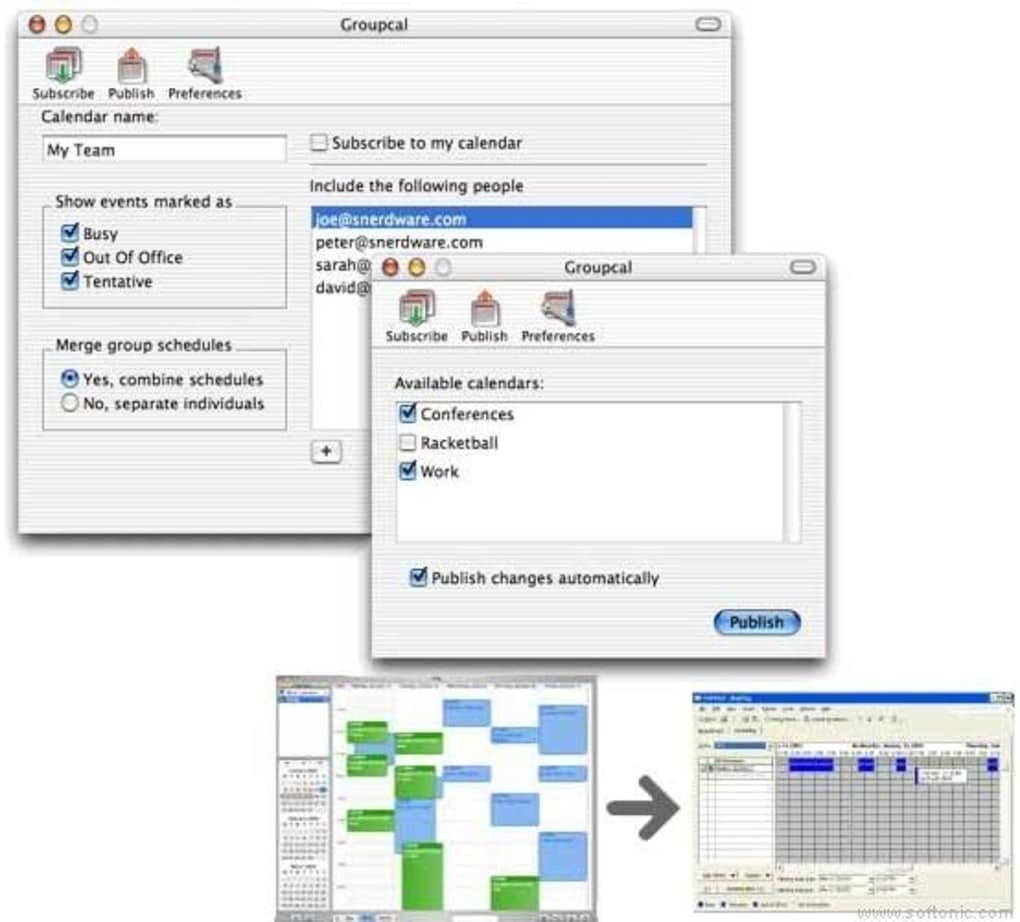
GroupCal is a lightweight, trial‑version Mac application designed to bridge the gap between iCal and Microsoft Exchange groups. Since its debut in 2006, the tool has helped thousands of Mac users publish, share, and synchronize iCal calendars across Exchange servers without the bloat of larger productivity suites. The current 3.90 build, released on June 19 2007, introduces a series of stability improvements, including better handling of recurring events, enhanced timezone support, and tighter integration with MarkSpace’s sync engines.
GroupCal’s primary selling point is its minimal storage footprint, making it an attractive option for users who need a reliable calendar bridge without sacrificing disk space or system performance. The application runs natively on Mac OS X (including legacy versions) and offers a clean, English‑only interface that focuses on essential calendar functions: publishing, sharing, and auto‑syncing with configurable intervals of 5 or 10 minutes. Whether you are a small business coordinating team meetings, an educational institution managing class schedules, or a freelance professional juggling multiple client calendars, GroupCal delivers a secure, update‑ready solution that respects the nuances of both iCal and Exchange ecosystems.
Key Features
- Bidirectional Sync: Seamlessly synchronize iCal calendars with Exchange group calendars, ensuring that changes made on either platform propagate instantly.
- Auto‑Sync Intervals: Choose 5‑minute or 10‑minute sync cycles for near‑real‑time updates, reducing the chance of missed appointments.
- Recurring Event Fixes: Advanced handling of recurring and detached events resolves common Exchange reporting errors.
- Free/Busy Compatibility: Supports Free/Busy lookups using email addresses, improving meeting scheduling accuracy.
- Timezone Enhancements: Updated timezone database includes previously missing entries, guaranteeing correct time conversions across regions.
- MarkSpace Integration: Optimized to work with MarkSpace syncers, providing a smoother experience for users of both tools.
- Lightweight Footprint: Requires significantly less disk space than comparable productivity suites, ideal for older Macs.
- Menu Bar Control: Quick access to sync status and settings via a Menu Extra, streamlining daily workflow.
- Secure Publishing: Calendar data is transmitted over encrypted channels, safeguarding sensitive appointment information.
- English‑Only Interface: A clear, uncluttered UI that focuses on core functionality without language distractions.
Installation & Usage Guide
Downloading and setting up GroupCal is straightforward, even for users who are new to Mac productivity tools. Follow these steps to get the application up and running:
- Download the Installer: Click the “Download GroupCal” button on the product page. The file is a compressed .dmg package optimized for Mac OS X.
- Mount the Disk Image: Double‑click the .dmg file to mount it. A window will appear showing the GroupCal icon and the Applications folder shortcut.
- Copy to Applications: Drag the GroupCal icon onto the Applications folder. This action copies the app and registers it with macOS.
- Launch the Application: Open the Applications folder and double‑click GroupCal. The first launch may trigger a security prompt; click “Open” to confirm.
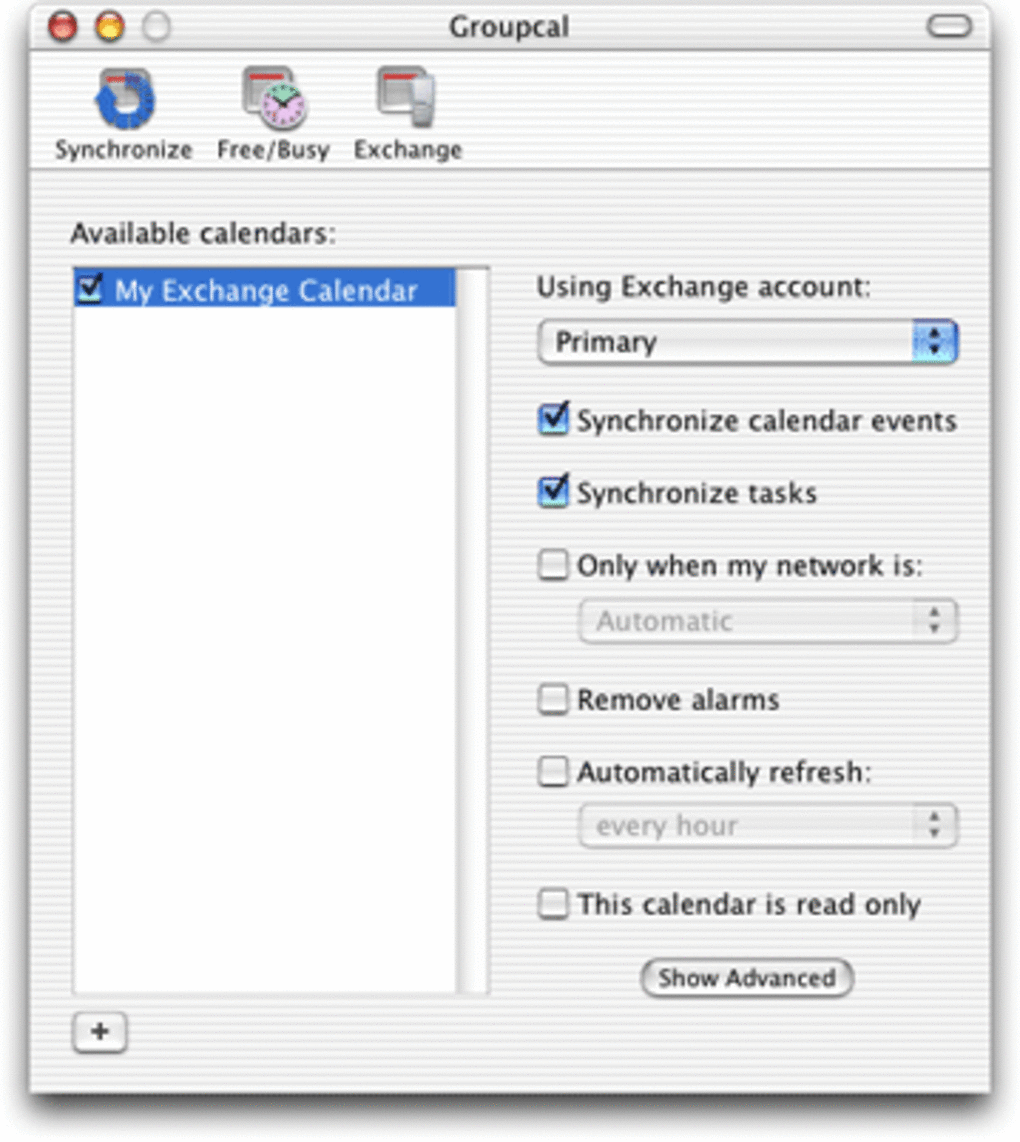
- Configure Exchange Settings: In the initial setup wizard, enter your Exchange server URL, username, and password. Enable “Publish iCal to Exchange” to allow two‑way sync.
- Select Sync Interval: Choose between 5‑minute or 10‑minute auto‑sync from the Preferences pane. You can also manually trigger a sync from the Menu Bar icon.
- Map Calendars: Assign which iCal calendars you want to publish to specific Exchange groups. Use the drag‑and‑drop interface for quick mapping.
- Test the Connection: Click “Sync Now” and verify that events appear correctly in both iCal and Exchange. Check for any error messages and adjust settings as needed.
- Fine‑Tune Preferences: Adjust notification settings, enable or disable Free/Busy publishing, and set timezone defaults in the Advanced Options tab.
Once configured, GroupCal runs silently in the background, updating calendars according to your chosen interval. The Menu Bar icon provides real‑time sync status, and any conflicts are highlighted with clear prompts, allowing you to resolve them without leaving the app. Regular updates are delivered automatically through the built‑in update checker, ensuring you always have the latest bug fixes and feature enhancements.
Compatibility, System Requirements & Performance
GroupCal is built specifically for Mac OS X, supporting versions from 10.4 (Tiger) through the latest macOS releases. Because the software is lightweight, it runs efficiently on both older PowerPC‑based Macs and modern Intel or Apple Silicon machines, though native Apple Silicon binaries are not yet available. Minimum system requirements include:
- Processor: 800 MHz or faster (Intel or PowerPC)
- RAM: 256 MB (512 MB recommended for smoother operation)
- Hard Disk: 20 MB of free space for the application and temporary sync files
- Network: Internet connection with access to your Exchange server (port 443 for HTTPS)
The application’s low memory usage means it can coexist with other productivity tools without causing noticeable slowdowns. Users have reported that GroupCal typically consumes less than 10 MB of RAM while idle and spikes to around 30 MB during active sync cycles—a negligible impact for contemporary Mac hardware. The program also respects macOS’s energy‑saving settings, automatically throttling sync activity when the laptop is on battery power to preserve battery life.
Security is a top priority; all data transmissions are encrypted using TLS 1.2, and the app stores credentials in the macOS Keychain, eliminating the need for third‑party password storage. Compatibility with Exchange Server 2003/2007/2010 has been thoroughly tested, and recent updates address known quirks with Exchange’s handling of empty event descriptions and recurring series, ensuring a smooth experience across a wide range of enterprise environments.
Pros, Cons, FAQ & Conclusion
Pros
- Lightweight and fast, ideal for older Mac hardware.
- Robust handling of recurring events and detached series.
- Configurable auto‑sync intervals (5 min / 10 min) keep calendars up‑to‑date.
- Secure TLS encryption and Keychain‑based credential storage.
- Seamless integration with MarkSpace syncers.
- Simple English‑only UI reduces learning curve.
Cons
- English‑only interface may limit non‑English speaking users.
- No native Apple Silicon build (runs under Rosetta on M1/M2).
- Trial version limits the number of synced calendars.
- Missing direct support for Google Calendar integration.
- Updates have not been released since 2007, raising concerns about long‑term support.
Frequently Asked Questions
Is GroupCal free or does it require a purchase?
GroupCal is offered as a trial version at no cost. The trial allows you to evaluate all core features, but full, unlimited use may require a one‑time license fee.
Can GroupCal sync with Google Calendar?
Out of the box, GroupCal focuses on iCal ↔ Exchange synchronization. While indirect sync is possible via third‑party services, native Google Calendar integration is not currently supported.
What should I do if a recurring event does not appear on Exchange?
First, verify that the event’s recurrence rule complies with Exchange’s standards. Then, run a manual “Sync Now” from the Menu Bar. If the issue persists, check the Log window for error codes and ensure your Exchange server is running the latest patches.
Does GroupCal work on macOS Ventura or later?
Yes, GroupCal runs on macOS Ventura and newer versions, though it operates under Rosetta on Apple Silicon machines because a native build has not been released.
How does GroupCal protect my calendar data during sync?
All communication with Exchange uses TLS 1.2 encryption, and user credentials are stored securely in the macOS Keychain. No data is written to plain‑text files on disk.
Conclusion & Call to Action
GroupCal remains a solid, no‑frills solution for Mac users who need reliable iCal‑to‑Exchange synchronization without the overhead of larger calendar suites. Its lightweight design, secure transmission, and thoughtful handling of recurring events make it a valuable addition to any productivity workflow, especially for teams that rely heavily on Exchange group calendars. While the lack of recent updates and limited language support are drawbacks, the core functionality still holds up for environments where stability and simplicity are paramount.
If you’re looking for a free, secure way to publish and share iCal calendars with Exchange, 0.00 USD download GroupCal today and experience hassle‑free calendar syncing on your Mac.







